

How Does Single V2 Micro Bit Improve STEM Skills?
Introduction
Single V2 Micro Bit is a practical learning tool that helps users explore coding, electronics, and hands-on innovation in a clear and engaging way. It is designed to make technical concepts easier to understand, especially for beginners who want to move beyond theory and start creating real projects. Because it combines programming with physical interaction, it brings learning to life in a way that feels both useful and enjoyable.
As technology becomes more important across education and industry, tools that support active learning continue to gain value. Single V2 Micro Bit gives students, teachers, and hobbyists a flexible platform for building digital confidence. From simple LED patterns to sensor-driven responses, it offers a smart introduction to modern microcontrollers, project design, and practical problem-solving.
What is a Single V2 Micro Bit and Why Is It Popular?
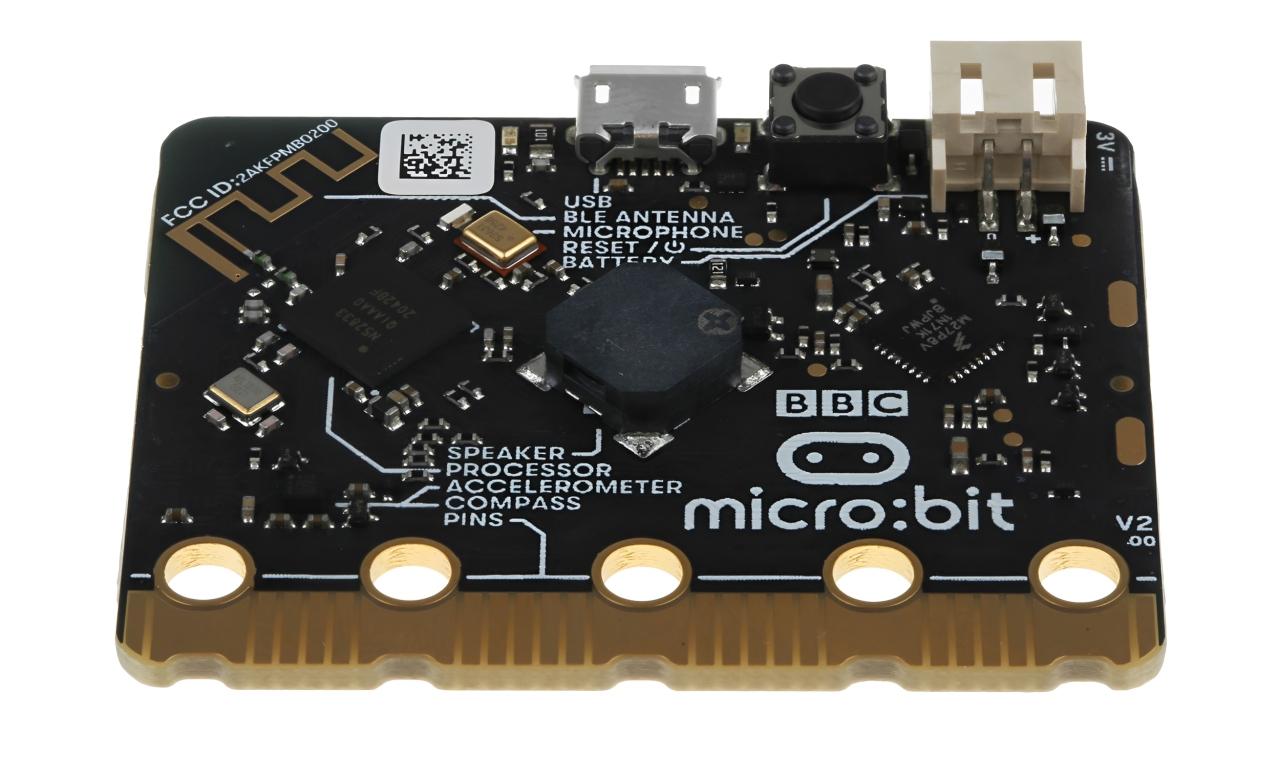
Single V2 Micro Bit is a compact, programmable board designed for coding and physical computing. It allows users to write code and instantly test it with built-in features such as LEDs, touch input, and responsive sensors. This direct link between software and action makes it especially effective for education.
Its popularity comes from its simplicity and flexibility. Beginners can start with basic tasks quickly, while more experienced users can create more advanced projects by adding external electronics. As a result, it suits classrooms, home learning, STEM clubs, and creative workshops equally well.
Built-In Features That Make Learning Easier
Single V2 Micro Bit includes several built-in functions that help users understand technical concepts through direct interaction. These features support faster learning and stronger engagement.
LED Matrix for Clear Visual Output
The LED matrix is one of the first features many users notice. It provides instant visual feedback, making coding more rewarding. Learners can display text, create symbols, animate icons, or show changing patterns without needing extra hardware.
This matters because visual output helps users understand logic more clearly. A short piece of code can create a visible result, which strengthens learning and encourages experimentation.
Sensors for Real Interaction
The board also includes sensors that allow it to respond to movement, touch, and sound. These built-in capabilities help learners create projects that feel active rather than static. Instead of only writing code, users can build systems that react to real conditions.
For example, students can create motion-based counters, sound-activated alerts, or touch-controlled games. In this way, sensors help explain how smart devices gather and use data.
Connectivity for Wider Project Possibilities
A single V2 Micro Bit can connect to external components, expanding the types of projects users can build. It works well with cables, connectors, switches, and various learning accessories. This makes it easier to move from beginner lessons to more practical electronics tasks.
By connecting additional components, learners start to understand how larger systems are built. That experience supports growth in both coding and electronics knowledge.
How It Supports STEM Education
STEM education works best when students can test ideas, solve problems, and see results. Single V2 Micro Bit supports this learning style by combining coding with real outputs and physical interaction.
It strengthens STEM development in several ways:
- It helps learners understand coding through practical action
- It introduces microcontrollers in a beginner-friendly format
- It connects science, design, and technology in one platform
- It encourages creativity and structured problem-solving
- It supports collaborative learning in classrooms and clubs
Because of these strengths, it is widely used to build confidence in technical subjects. It not only teaches coding. It also helps learners understand how digital systems operate in the wider world.
Practical Project Ideas with Single V2 Micro Bit
Single V2 Micro Bit is flexible enough for a wide range of learning projects. These projects can be simple or more advanced, depending on the user’s skill level.
Beginner Coding Tasks
New users can start with projects such as displaying names, creating emoji-style icons, or counting button presses. These early tasks introduce key programming ideas simply and effectively.
Interactive Electronics Builds
Once learners gain confidence, they can connect other components to the board. They may use switches for control, external LEDs for added output, or simple modules for testing. This helps explain the practical relationship between code and electronics.
Monitoring and Response Projects
The board can support ideas linked to sensors, thermal conditions, and responsive systems. For instance, students may build a basic alert project that reacts to sound or movement. These activities help them understand how digital devices monitor and respond to change.
Creative Design Projects
Single V2 Micro Bit also works well for visual and imaginative projects. Users can create mini games, wearable concepts, or simple smart displays. With the right tools, grips, and tidy assembly methods, even basic projects can look polished and professional.
Related Components and Concepts
Although the board includes many useful features, it becomes even more valuable when learners understand the wider parts and principles around it. This helps place the Single V2 Micro Bit within the broader world of electronics and digital systems.
Related items and concepts include:
- Cables for connections and power
- Connectors for linking external parts
- Sensors for motion, sound, and environmental input
- Switches for user interaction
- LEDs for lighting and visual feedback
- Fuses for discussing electrical safety
- Thermal pads for broader learning about heat handling
- Capacitor concepts in simple electronics discussions
- Controllers used in other programmable systems
- Microprocessors and microcontrollers as part of wider computing topics
- Laptops are used to write, test, and transfer code
In some advanced learning discussions, users may also come across terms such as contactors, safety components, and electronic control systems. While these are typically found in more complex applications, the Single V2 Micro Bit provides a useful first step toward understanding how such technologies work.
Why It Works for Different Skill Levels
One of the biggest strengths of the Single V2 Micro Bit is that it stays useful as learners progress. A complete beginner can use it to understand simple logic and outputs. Later, the same user can return to it for more complex builds involving connected parts and project planning.
Beginners benefit from:
- Easy setup
- Quick visual results
- Friendly introduction to coding
- Clear learning through practice
More advanced users benefit from:
- Flexible project expansion
- Fast testing for ideas
- Better understanding of integrated systems
- A reliable base for creative experimentation
This broad usefulness makes it a lasting tool rather than a short-term learning device.
Best Practices for Using Single V2 Micro Bit
To get the best results, it helps to start small and build confidence gradually. Users should begin with simple code and built-in functions before moving to larger projects with added components. This approach makes learning more manageable and more effective.
It is also important to work carefully and keep safety in mind. Good habits such as secure connections, correct cable use, and organised project layouts make a real difference. These steps improve reliability while helping learners understand responsible electronics practice.
Final Thoughts
Single V2 Micro Bit is more than just a compact programmable board. It is a practical gateway into coding, electronics, and creative technical learning. With its built-in LEDs, responsive sensors, and support for connected components, it helps users turn ideas into working projects in a clear, engaging way.
For anyone looking to build STEM skills through active learning, Single V2 Micro Bit offers a strong starting point. It encourages curiosity, supports hands-on progress, and makes digital concepts easier to understand through real experience.

 Arabic
 French
 Spanish
 Portuguese
 Deutsch
 Turkish
 Dutch
Dutch
 Italiano
 Russian
 Romaian
 Portuguese (Brazil)
 Greek
Greek